
מה זה מטרוניתא
מטרוניתא היא עוזרת שידוכים שעובדת דרך המייל. שולחים לכתובת matronitashiduchim@gmail.com מייל עם פרטי הבחור או הבחורה, ותוך דקות מגיעה תשובה במייל עם הצעות מתאימות מתוך מאגר המועמדים.
- המאגר: גיליון Google של מועמדים, בשתי לשוניות: בנים ובנות. המערכת מעתיקה אותו אליה פעם בשעה, כך שהחיפוש מהיר ותמיד עדכני עד כשעה.
- הכללים: כללי כהונה, טווח גילאים ודרישות שציינתם נבדקים לפני שמשהו מוצע. מי שחסר אצלו פרט שכלל מחייב תלוי בו, לא מוצע, אלא נספר בנפרד.
- התשובה: עד 5 הצעות, מסודרות לפי ציון התאמה, עם פרטי קשר והסבר קצר לכל ציון. רוצים עוד? משיבים "עוד 5".
- פרופיל מלא: שולחים שם או מזהה של מועמד בכותרת, ומקבלים את כל הפרטים שלו מהגיליון.
- עברית קודם: אפשר לכתוב בעברית או באנגלית, והתשובה מגיעה באותה שפה, באותיות גדולות ומיושרת לימין בעברית.
המערכת רק קוראת את הגיליון. היא לא משנה בו דבר.
למי זה מיועד
לשדכנים ושדכניות מורשים בלבד. רק מיילים שנשלחים מכתובות מורשות מקבלים הצעות. מי שכותב מכתובת שאינה רשומה מקבל תשובה קצרה: השירות מיועד למשתמשים רשומים בלבד, ולבקשת הצטרפות כותבים ל-matronitashiduchim@gmail.com. (תשובה כזו נשלחת לכל היותר פעם ביממה לכל כתובת.)
רוצים להצטרף? כתבו לכתובת הזו או פנו למנהל המערכת. מנהלי המערכת מוסיפים ומסירים משתמשים בפקודות מנהלים.
איך שולחים בקשה, צעד אחר צעד
- פותחים מייל חדש אל matronitashiduchim@gmail.com, מהכתובת המורשית שלכם.
- כותבים כותרת (נושא). חובה. כל כותרת רגילה מתאימה, למשל "בקשה" או שם הבחור. מייל בלי כותרת מקבל תשובה שמבקשת לשלוח שוב עם כותרת. (יש כמה כותרות מיוחדות, ראו פקודות.)
- בגוף המייל כותבים שורה לכל פרט, בצורה
שדה: ערך. למשלגיל: 23. אפשר להעתיק את השמות מטבלת השדות, או לבקש טופס ריק: שולחים מייל עם הכותרתטופס. - ממלאים את 3 שדות החובה: מין, גיל ומצב משפחתי. כל השאר אופציונלי. כהן: מי שלא סומן כהן נחשב לא כהן.
- שולחים. המערכת בודקת את תיבת הדואר כל דקה. התשובה מגיעה באותו שרשור.
- ממשיכים באותו שרשור: "עוד 5" להצעות נוספות, או שורה אחת עם פרט ששונה (למשל
הפרש מקסימלי: 5) לחיפוש מחודש עם כל שאר הפרטים הקודמים. הצעות שכבר נשלחו בשרשור לא חוזרות.
אפשר גם בקיצור, בלי נקודתיים: בחור בן 22, או רשימה מופרדת בפסיקים כמו בחור, 22, רווק, לא כהן. המערכת תבקש את מה שחסר. לבקשה מפורטת עדיף שדה: ערך בכל שורה.
כל השדות
שם השדה, נקודתיים, ואז הערך. אפשר בעברית או באנגלית (השם האנגלי מופיע בטבלה). אותיות גדולות/קטנות באנגלית לא משנות.
| שדה | באנגלית | ערכים | חובה? | מה זה עושה |
|---|---|---|---|---|
מין | gender | בחור / בחורה (או גבר, אישה, זכר, נקבה) | חובה | על מי הבקשה. ההצעות יהיו מהמין השני. |
גיל | age | מספר, 18 עד 120 | חובה | הגיל של מי שמחפשים עבורו. |
מצב משפחתי | marital status | רווק / רווקה / גרוש / גרושה / אלמן / אלמנה | חובה | נדרש לכללי הכהונה. |
כהן | kohen | כן / לא | אופציונלי | כהן לא מוצע עם גרושה. בלי ציון, הבחור נחשב לא כהן. |
טלפון | phone | כשר / סמארטפון | אופציונלי | סוג הטלפון של המבקש (תיאור). כדי לסנן לפי טלפון, השתמשו ב"טלפון נדרש". |
כיסוי ראש | head covering | פאה / מטפחת | אופציונלי | בבקשה עבור בחור: מה הוא מבקש מהכלה. מי שכתוב אצלה כיסוי ראש אחר לא מוצעת; מי שלא כתוב אצלה כיסוי ראש, מוצעת. |
עדה | community | אשכנזי / ספרדי / חצי חצי | אופציונלי | מעלה את הציון למי שמאותה עדה (כש"אותה עדה" = כן). |
בת כהן | daughter of a kohen | כן / לא | אופציונלי | לבחורה. גרוש עם בת כהן מותר, ולכן זה לא פוסל. |
מיקום (או אזור) | location | עיר, למשל ירושלים | אופציונלי | מעלה את הציון למי שגר באותה עיר. |
דתיות | lifestyle | טקסט חופשי | אופציונלי | מעלה את הציון כשזהה בדיוק. |
מצב משפחתי נדרש | partner marital status | רווק / גרוש / אלמן | אופציונלי | דרישה מחייבת מבן/בת הזוג. מי שלא עומד בה לא מוצע; מי שהפרט לא כתוב אצלו בגיליון, מעוכב ונספר. |
טלפון נדרש | partner phone | כשר / סמארטפון | אופציונלי | דרישה מחייבת מבן/בת הזוג. מי שלא עומד בה לא מוצע; מי שהפרט לא כתוב אצלו בגיליון, מעוכב ונספר. |
כיסוי ראש נדרש | partner head covering | פאה / מטפחת | אופציונלי | דרישה מחייבת מבן/בת הזוג. מי שכתוב אצלה כיסוי ראש אחר לא מוצעת; מי שלא כתוב אצלה כיסוי ראש, מוצעת. |
עדה נדרשת | partner community | אשכנזי / ספרדי / חצי חצי | אופציונלי | דרישה מחייבת מבן/בת הזוג. מי שלא עומד בה לא מוצע; מי שהפרט לא כתוב אצלו בגיליון, מעוכב ונספר. |
דתיות נדרשת | partner lifestyle | טקסט חופשי | אופציונלי | דרישה מחייבת מבן/בת הזוג. מי שלא עומד בה לא מוצע; מי שהפרט לא כתוב אצלו בגיליון, מעוכב ונספר. |
הפרש מינימלי | age min | מספר (אפשר שלילי) | אופציונלי | הגבול התחתון של הפרש הגילאים. הפרש = גיל הבחור פחות גיל הבחורה. ברירת מחדל 0. למשל -2: הבחורה יכולה להיות מבוגרת עד שנתיים. |
הפרש מקסימלי | age max | מספר | אופציונלי | הגבול העליון של הפרש הגילאים (גיל הבחור פחות גיל הבחורה). ברירת מחדל 3. |
אותה עדה | same community | כן / לא (ברירת מחדל: כן) | אופציונלי | האם עדה זהה נחשבת בציון. זה לא מסנן. כדי לסנן, השתמשו ב"עדה נדרשת". |
שפה | language | עברית / English | אופציונלי | שפת התשובה. בלי השדה הזה, התשובה בשפה שבה כתבתם. |
כל שדה פעם אחת בלבד. שדה שהמערכת לא מכירה, או ערך שאינו ברשימה, מקבל תשובת "נדרש בירור" במקום ניחוש.
דוגמה לבקשה ולתשובה
כל השמות, המזהים והטלפונים כאן מומצאים, לצורך הדגמה בלבד.
הבקשה
מין: בחור
גיל: 24
מצב משפחתי: רווק
כהן: כן
טלפון: כשר
כיסוי ראש: פאה
עדה: ספרדי
מיקום: ירושלים
הפרש מינימלי: 0
הפרש מקסימלי: 4
אותה עדה: כן
התשובה (מקוצרת)
הציון משקף התאמה לקריטריונים שנמסרו, ולא את ההסתברות לנישואין מוצלחים. כל תוצאה כוללת הסבר קצר לציון שלה. באחריות השדכן או השדכנית להתפלל ולהפעיל שיקול דעת…

נמצאו 2 הצעות
הפרש גיל: 0 עד 4; העדפת אותה עדה: כן

1. פלונית לדוגמה [f-000000000001] - 21 - 100/100
רווק/ה, ספרדי, פאה, ירושלים
050-0000000 (דוגמה)
עדה: תואם; מיקום: תואם; גיל: תואם

2. אלמונית לדוגמה [f-000000000002] - 22 - 36/100
רווק/ה, אשכנזי, פאה, בני ברק
052-0000000 (דוגמה)
עדה: לא תואם; מיקום: לא תואם; גיל: תואם

37 פרופילים נוספים לא הוצגו כי חסר בהם פרט הנדרש לכלל מחייב (מצב משפחתי, גיל או דרישה שצוינה). יש לברר מול המשפחה לפני הצעה.

להצעות נוספות השיבו "עוד 5", או שלחו קריטריונים מעודכנים.
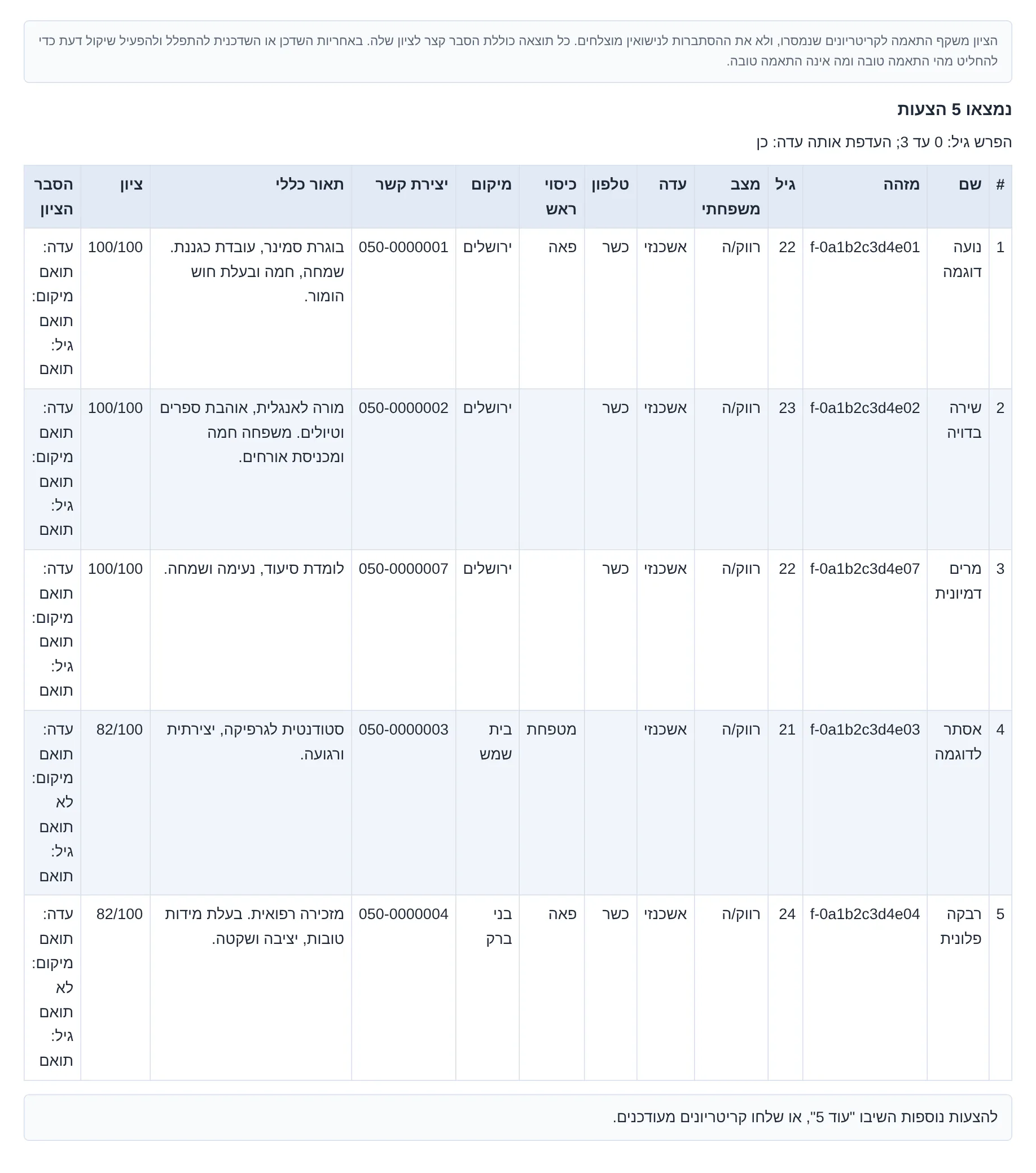
כל הצעה כוללת: שם, מזהה, גיל, ציון מתוך 100, פרטים עיקריים, פרטי קשר (וקישורים לקורות חיים כשיש), והסבר הציון.
במייל עצמו התשובה מגיעה כטבלה מסודרת: שורה לכל הצעה, רקע מתחלף לשורות, אותיות גדולות ויישור לימין. למעלה מוצגת גרסת הטקסט; כך נראית התשובה במייל (לבקשה אחרת):
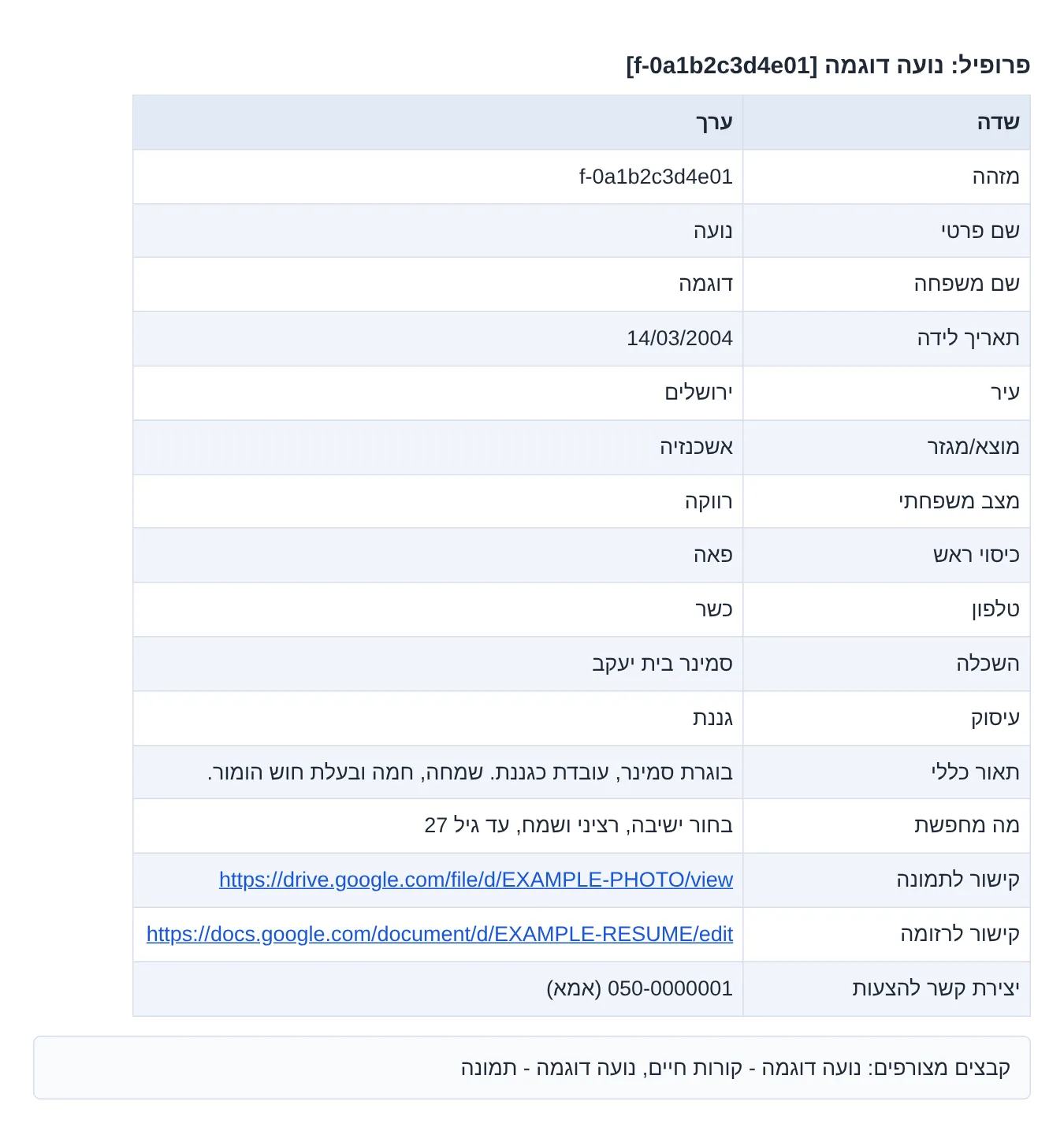
פרופיל מלא של מועמד/ת
שולחים בכותרת שם פרטי ושם משפחה (או מזהה, למשל f-0a1b2c3d4e01), ומקבלים את כל העמודות של אותה שורה בגיליון, כולל קישורים, וקורות חיים ותמונה כקבצים מצורפים כשיש.
איך נבחרות ההצעות
כללים מחייבים (מי שלא עומד בהם לא מוצע)
- כהן וגרושה: בחור כהן לא מוצע עם גרושה, ובחורה גרושה לא מקבלת הצעה של בחור כהן.
- כהונה רק כשכתוב במפורש: המערכת מסמנת "כהן" או "בת כהן" רק כשזה נכתב בגיליון כסטטוס (למשל בהערות). לעולם לא לפי שם משפחה. אם לא כתוב ברשימה שהבחור כהן, הוא נחשב לא כהן.
- גרוש ובת כהן: מותר, ולכן לא נפסל.
- טווח גילאים: גיל הבחור פחות גיל הבחורה חייב להיות בין ההפרש המינימלי למקסימלי (ברירת מחדל 0 עד 3).
- דרישות שציינתם (השדות עם "נדרש/ת"), ובבחור גם כיסוי הראש: מי שהפרט שלו שונה, לא מוצע.
מעוכבים (חסר פרט, לא נפסלו)
כשכלל מחייב תלוי בפרט שלא כתוב בגיליון, המערכת לא מנחשת. הפרופיל לא מוצע, ובסוף התשובה מופיע כמה פרופילים כאלה היו. למשל:
- בקשה לבחור כהן: בחורה שמצבה המשפחתי לא ברור (למשל כתוב גם רווקה וגם גרושה).
- בחור או בחורה בלי גיל ידוע.
- דרישה שציינתם (למשל עדה נדרשת) כשהפרט לא כתוב אצל המועמד. כיסוי ראש הוא יוצא דופן: מי שלא כתוב אצלה כיסוי ראש, מוצעת.
הציון
מבין מי שעבר את הכללים, ההצעות מסודרות לפי ציון התאמה מתוך 100. הציון בנוי מהפריטים שציינתם בבקשה:
| פריט | משקל | מתי נחשב |
|---|---|---|
| דתיות | 35 | אם ציינתם דתיות, וזהה |
| עדה | 25 | אם ציינתם עדה, "אותה עדה" = כן, והעדה זהה |
| מיקום | 10 | אם ציינתם מיקום, וזהה |
| גיל | 20 | תמיד: הפרש של 0 עד 3 שנים (הבחור מבוגר) |
הציון = אחוז המשקל שהתאים, מתוך הפריטים שנבדקו. הוא מודד התאמה לקריטריונים בלבד. ההחלטה מהי התאמה טובה נשארת בידי השדכן.
פקודות בכותרת ובגוף המייל
| כותבים | איפה | מה מקבלים |
|---|---|---|
| (כותרת ריקה) | כותרת | "title is mandatory. resend with title" / "חובה לכתוב כותרת. שלחו שוב עם כותרת". לא מתבצע חיפוש. (אלא אם השורה הראשונה בגוף היא פקודה, ראו למטה.) |
טופס | כותרת | טופס בקשה ריק בעברית: כל השדות, שדות החובה קודם, האופציונליים מסומנים. ממלאים ומשיבים. |
form | כותרת | אותו טופס, באנגלית. |
מטרוניתא או matronita | כותרת | מעשה המטרונה ורבי יוסי בן חלפתא (מדרש בראשית רבה, פרשה סח, דרשה ד), שעל שמו נקראת המערכת. |
עוד 5 / 5 more / עוד / more | שורה ראשונה בגוף, בתשובה בשרשור | ההצעות הבאות שעוד לא נשלחו. פרטים. |
שמור ברירות מחדל ואחריו שורות | גוף | שומר לכם קבועים: הפרש מינימלי, הפרש מקסימלי, אותה עדה, שפה. הם יחולו על כל בקשה שלכם בלי לכתוב אותם שוב. (כללי ההלכה לא ניתנים לשינוי.) |
הצג ברירות מחדל | גוף | מציג את ברירות המחדל השמורות שלכם. |
אפס ברירות מחדל | גוף | מחזיר לברירות המחדל של המערכת. |
שם פרטי ושם משפחה, או מזהה כמו [f-000000000001] | כותרת | הפרופיל המלא: כל העמודות של אותה שורה בגיליון, בטבלה. אם יש מזהה, החיפוש לפיו; אחרת לפי השם (בכל סדר, בלי תלות בניקוד או באותיות סופיות). כמה אנשים באותו שם יחזרו כולם. שם שלא נמצא מקבל "לא נמצא פרופיל". קישורי התמונה וקורות החיים מופיעים בטבלה; בקרוב הם יצורפו גם כקבצים. |
| כל פקודות הכותרת (טופס, מטרוניתא, שם, מזהה) | שורה ראשונה בגוף | אפשר לכתוב את הפקודה בשורה הראשונה של הגוף במקום בכותרת, כשהכותרת ריקה או רגילה, וגם בתשובה בשרשור. כותרת ריקה עם בקשה רגילה בגוף עדיין מקבלת "חובה לכתוב כותרת". |
כל כותרת אחרת היא כותרת רגילה, והגוף נקרא כבקשה. מייל שיש בגופו שדות בקשה הוא תמיד בקשה, גם אם בכותרת כתוב שם. "Re:" או "השב:" בתחילת הכותרת לא נחשבים.
דוגמה לשמירת ברירות מחדל (בגוף המייל):
שמור ברירות מחדל
הפרש מינימלי: -1
הפרש מקסימלי: 4
אותה עדה: לא
פקודות מנהלים
שלוש פקודות לניהול רשימת המשתמשים המורשים. הן פועלות רק ממיילים של מנהלי המערכת. משתמש רשום אחר ששולח אותן מקבל תשובה שרק מנהלים יכולים להוסיף או להסיר משתמשים.
הוסף משתמש: example@example.com
אוadd user: example@example.com
הכתובת מצטרפת למשתמשים המורשים ויכולה לשלוח בקשות מיד. כתובת שהוסרה בעבר חוזרת להיות מורשית.הסר משתמש: example@example.com
אוremove user: example@example.com
הכתובת מוסרת ולא מקבלת יותר הצעות, גם אם היא ברשימת השיתוף של הגיליון. אי אפשר להסיר מנהל.רשימת משתמשיםאוlist users
כל המשתמשים המורשים, ומי שהוסר.
- כותבים את הפקודה בכותרת או בגוף המייל. אפשר כמה פקודות במייל אחד, פקודה בכל שורה, וגם הוספה והסרה יחד. פקודה אחת יכולה לכלול כמה כתובות מופרדות בפסיקים, ושורה שיש בה רק כתובת מייל מקבלת את הפקודה שמעליה (או את הפקודה שבכותרת).
- המערכת מתעלמת מהחתימה: הקריאה נעצרת בשורת חתימה (--, "בברכה", "תודה", "נשלח מ…") ובטקסט המצוטט, ושורות בלי כתובת מייל (שם, טלפון, ברכה) מדולגות. כתובת מייל שמופיעה בחתימה לא נוספת.
- אותיות גדולות או קטנות לא משנות, ומותר רווח לפני או אחרי הנקודתיים.
- התשובה קצרה, בעברית ואז באנגלית: שורה לכל כתובת (נוסף, הוסר, כבר מורשה, לא נמצא ברשימה, מנהל שאי אפשר להסיר, או כתובת מייל לא תקינה), ובסוף מספר המשתמשים המורשים.
- השינויים נשמרים במערכת ונשארים בתוקף גם אחרי הפעלה מחדש.
דוגמה:
התשובה:
✅ example@example.com נוסף/ה למשתמשים המורשים. סה"כ מורשים: 12✅ example@example.com was added to the authorized users. Total authorized: 12
דוגמה עם כמה שורות (החתימה בסוף לא נקראת):
הוסף משתמש: example1@example.com
הוסף משתמש: example2@example.com
הסר משתמש: example3@example.com

--
ישראל ישראלי
050-0000000
התשובה:
✅ נוסף/ה: example1@example.com
✅ נוסף/ה: example2@example.com
✅ הוסר/ה: example3@example.com
סה"כ מורשים: 13
✅ Added: example1@example.com
✅ Added: example2@example.com
✅ Removed: example3@example.com
Total authorized: 13
עוד הצעות (עוד 5)
כל תשובה מביאה עד 5 הצעות. כדי לקבל את הבאות, משיבים באותו שרשור ובשורה הראשונה כותבים אחד מאלה:
עוד · עוד 5 · 5 עוד · more · more 5 · 5 more
- בכל פעם מגיעות לכל היותר 5 הצעות. בקשה ליותר מ-5 מביאה 5, עם השורה "מוגבל ל-5 תוצאות לכל בקשה".
- רק הצעות שעוד לא נשלחו בשרשור הזה.
- הטקסט המצוטט שהמייל מוסיף מתחת ("בתאריך … נכתב:") לא מפריע.
- כשנגמרו ההצעות, תגיע הודעה שאין הצעות נוספות, ואפשר לשלוח קריטריונים מעודכנים.
- "עוד" בשרשור שאין בו עדיין תוצאות מקבל הסבר ששולחים קודם בקשה.
מזהים (ID)
לכל פרופיל יש מזהה קבוע, שמופיע בסוגריים ליד השם: f- ו־12 תווים לבחורה, m- ו־12 תווים לבחור (למשל f-000000000001, מומצא).
- המזהה נשאר זהה בכל סנכרון, גם כשנוספות, נמחקות או זזות שורות בגיליון.
- הוא משתנה רק אם משנים בגיליון את השם או את פרטי הקשר של אותה שורה. אז הפרופיל עלול להיות מוצע שוב בשרשור ישן.
- שורות כפולות לגמרי נספרות פעם אחת, כך ששני פרופילים לא חולקים מזהה.
- שלחו מזהה בכותרת (או בשורה הראשונה של הגוף) ותקבלו את הפרופיל המלא. אם המזהה השתנה, המערכת תחפש לפי השם שלידו.
פרטיות
- הפרופילים במאגר הם מידע אישי אמיתי של משפחות.
- תשובות נשלחות רק לשדכנים מורשים, ורק לכתובת שממנה נשלחה הבקשה.
- המערכת לא מעבירה מידע לאף אחד אחר ולא מפרסמת אותו. היא רק קוראת את הגיליון, ולא משנה בו דבר.
- המידע שבתשובות נועד לשימושכם כשדכנים בלבד. נא לא להעביר אותו הלאה.
שאלות נפוצות
למה קיבלתי מעט הצעות, או אף אחת?
בדרך כלל אחת מאלה: טווח הגילאים צר (ברירת המחדל 0 עד 3; נסו הפרש מינימלי: -2 ו־הפרש מקסימלי: 6), דרישה מחייבת שציינתם (עדה נדרשת, טלפון נדרש וכו') שהרבה מועמדים לא מציינים בגיליון, או כלל כהונה. בסוף התשובה כתוב כמה פרופילים עוכבו בגלל פרט חסר.
מה זה "פרופילים נוספים לא הוצגו" (מעוכבים)?
אלה מועמדים שלא נפסלו, אבל חסר אצלם בגיליון פרט שכלל מחייב תלוי בו: מצב משפחתי, גיל, או דרישה שציינתם. המערכת לא מניחה דבר שלא כתוב, ולכן לא מציעה אותם. אם חשוב לכם, ביררו את הפרט מול המשפחה, ובקשו לעדכן את הגיליון.
כל כמה זמן המאגר מתעדכן?
פעם בשעה המערכת קוראת מחדש את כל הגיליון. שינוי בגיליון יופיע בתשובות תוך שעה לכל היותר. תיבת הדואר נבדקת כל דקה, כך שתשובה מגיעה בדרך כלל תוך דקה־שתיים.
שלחתי ולא קיבלתי שום תשובה.
ודאו ששלחתם מהכתובת המורשית שלכם. מייל מכתובת שלא אושרה לא נענה בכלל. אם שלחתם מהכתובת הנכונה, פנו למנהל.
קיבלתי "נדרש בירור".
חסר שדה חובה, או ששורה לא הובנה (שם שדה לא מוכר, ערך שלא ברשימה, שדה שמופיע פעמיים). הסיבה כתובה בתשובה. השיבו באותו שרשור עם התיקון בלבד, ושאר הפרטים נשמרים.
האם כהונה נקבעת לפי שם המשפחה?
לא. רק כשכתוב בגיליון במפורש שהמועמד כהן, או שהמועמדת בת כהן. אם לא כתוב ברשימה שהבחור כהן, הוא נחשב לא כהן. גם בבקשה עצמה: בלי כהן: כן, הבחור נחשב לא כהן.
אפשר לבקש באנגלית?
כן. כותבים את השדות באנגלית (ראו העמודה "באנגלית" בטבלה), והתשובה תגיע באנגלית. אפשר גם לבקש שפה מסוימת עם השדה שפה.
יצירת קשר
להצטרפות כשדכן מורשה, לשאלות או לתיקון פרטים במאגר, פנו למנהל המערכת דרך טופס יצירת הקשר של SmartApz.
כתובת המערכת לבקשות: matronitashiduchim@gmail.com (לשדכנים מורשים בלבד).
What Matronita is
Matronita (מטרוניתא) is a matchmaking (shidduchim) assistant that works by email. Send an email with the details of the young man or woman to matronitashiduchim@gmail.com, and within minutes you get a reply with suitable suggestions from the candidate list.
- The list: a Google Sheet of candidates with two tabs, men (בנים) and women (בנות). The system copies it every hour, so searches are fast and never more than about an hour behind.
- The rules: Kohen rules, the age window and any requirements you state are checked before anyone is suggested. A candidate missing a detail that a strict rule needs is not suggested; they are counted separately.
- The reply: up to 5 suggestions ranked by a match score, with contact details and a short explanation of each score. Want more? Reply "5 more".
- Full profile: send a candidate's name or ID as the subject and get all their details from the sheet.
- Hebrew first: write in Hebrew or English; the reply comes back in the same language, in large type, right-aligned for Hebrew.
The system only reads the sheet. It never changes it.
Who it's for
Authorized matchmakers only. Only emails sent from authorized addresses get suggestions. Anyone writing from an address that isn't registered gets a short reply: the service is for registered users only, and to apply, write to matronitashiduchim@gmail.com. (That reply goes out at most once a day per address.)
Want to join? Write to that address or contact the admin. The owners add and remove users with the owner commands.
Sending a request, step by step
- Start a new email to matronitashiduchim@gmail.com from your authorized address.
- Write a subject. It's required. Any ordinary subject works, e.g. "Request" or the candidate's first name. An email with no subject gets a reply asking you to resend with one. (A few subjects are special, see commands.)
- In the body, write one detail per line as
field: value, e.g.age: 23. Copy the names from the field table, or get a blank form: send an email with the subjectform. - Fill in the 3 required fields: gender, age and marital status. Everything else is optional. Kohen: anyone not marked as a Kohen is treated as not a Kohen.
- Send. The mailbox is checked every minute. The reply arrives in the same thread.
- Keep going in the same thread: "5 more" for more suggestions, or just the line you want to change (e.g.
age max: 5) for a new search that keeps all your earlier details. Suggestions already sent in the thread are not repeated.
Short forms also work, without colons: male 22, or a comma list like male, 22, single, not kohen. The system asks for whatever is missing. For a detailed request, one field: value per line is best.
All fields
Field name, a colon, then the value. Hebrew or English names both work (the Hebrew name is in the table). Capitalization doesn't matter. Underscore forms like age_min work too.
| Field | Hebrew | Values | Required? | What it does |
|---|---|---|---|---|
gender | מין | male / female (or man, woman) | required | Who the request is for. Suggestions come from the other gender. |
age | גיל | a number, 18–120 | required | The age of the person you're searching for. |
marital status | מצב משפחתי | single / divorced / widowed | required | Needed for the Kohen rules. |
kohen | כהן | yes / no | optional | A Kohen is never suggested with a divorcée. Left out, the man is treated as not a Kohen. |
phone | טלפון | kosher / smartphone | optional | The requester's own phone type (descriptive). To filter by phone, use "partner phone". |
head covering | כיסוי ראש | wig / scarf | optional | In a request for a man: what he wants his wife to wear. A woman whose row states a different head covering isn't suggested; one whose row doesn't mention head covering is. |
community | עדה | ashkenazi / sefardi / mixed | optional | Raises the score for the same community (when "same community" is yes). |
daughter of a kohen | בת כהן | yes / no | optional | For a woman. A divorced man with a daughter of a Kohen is allowed, so it doesn't exclude anyone. |
location | מיקום / אזור | a city, e.g. Jerusalem | optional | Raises the score for the same city. |
lifestyle | דתיות | free text | optional | Raises the score on an exact match. |
partner marital status | מצב משפחתי נדרש | single / divorced / widowed | optional | Strict requirement for the partner. Anyone who doesn't meet it isn't suggested; anyone whose sheet row doesn't state it is held back and counted. |
partner phone | טלפון נדרש | kosher / smartphone | optional | Strict requirement for the partner. Anyone who doesn't meet it isn't suggested; anyone whose sheet row doesn't state it is held back and counted. |
partner head covering | כיסוי ראש נדרש | wig / scarf | optional | Strict requirement for the partner. A candidate whose row states a different head covering isn't suggested; one whose row doesn't mention head covering is shown. |
partner community | עדה נדרשת | ashkenazi / sefardi / mixed | optional | Strict requirement for the partner. Anyone who doesn't meet it isn't suggested; anyone whose sheet row doesn't state it is held back and counted. |
partner lifestyle | דתיות נדרשת | free text | optional | Strict requirement for the partner. Anyone who doesn't meet it isn't suggested; anyone whose sheet row doesn't state it is held back and counted. |
age min | הפרש מינימלי | a number (may be negative) | optional | Lower bound of the age difference. Difference = the man's age minus the woman's. Default 0. −2 = she may be up to 2 years older. |
age max | הפרש מקסימלי | a number | optional | Upper bound of the age difference (the man's age minus the woman's). Default 3. |
same community | אותה עדה | yes / no (default yes) | optional | Whether a matching community counts in the score. It doesn't filter; to filter, use "partner community". |
language | שפה | Hebrew / English | optional | The reply language. Without it, the reply uses the language you wrote in. |
Each field once only. An unknown field, or a value not on the list, gets a "please clarify" reply rather than a guess.
Example request and reply
All names, IDs and phone numbers here are made up, for illustration only.
The request
gender: female
age: 21
marital status: single
community: ashkenazi
location: Bnei Brak
age min: 0
age max: 5
partner phone: kosher
The reply (shortened)
The score represents alignment with the supplied criteria, not the probability of a successful marriage. Every result includes a brief explanation of its score. It is the matchmaker's responsibility to daven and use common sense…

Found 2 potential matches
Age difference: 0 to 5; same community preference: True

1. Ploni Example [m-000000000001] - 23 - 100/100
single, ashkenazi, kosher, bnei brak
050-0000000 (example)
community: aligned; location: aligned; age: aligned

2. Almoni Example [m-000000000002] - 25 - 45/100
single, ashkenazi, kosher, jerusalem
052-0000000 (example)
community: aligned; location: not aligned; age: not aligned

112 more profiles were not shown because a detail a required rule depends on (marital status, age or a stated requirement) is missing in the source. Confirm with the family before suggesting them.

Reply "5 more" for additional candidates, or send updated criteria.
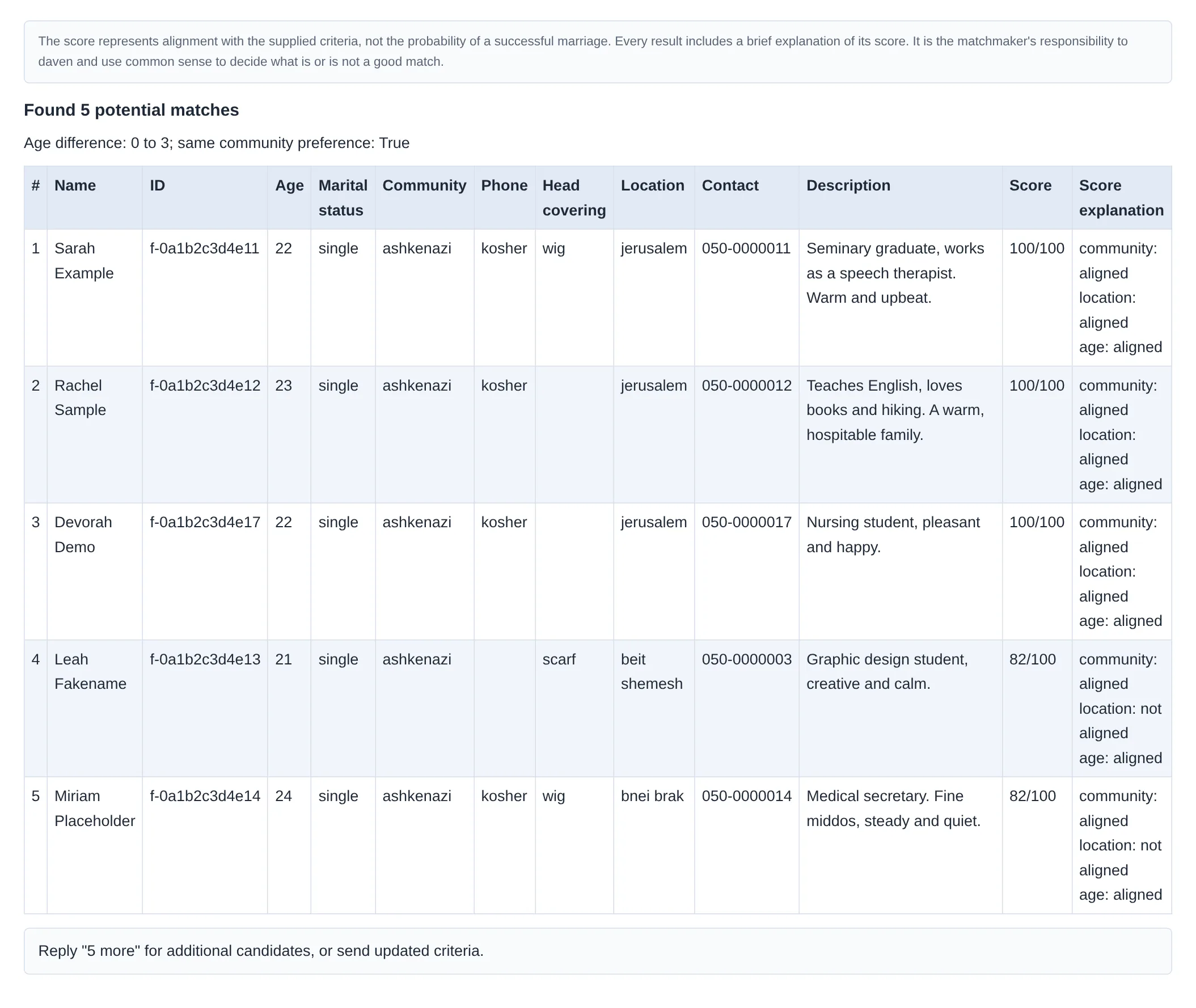
Each suggestion shows: name, ID, age, a score out of 100, key details, contact details (and resume links when there are any), and the score explanation.
In the email itself the reply arrives as a neat table: one row per suggestion, alternating row colors, large type. Above is the plain-text version; this is how the reply looks in the email (for a different request):
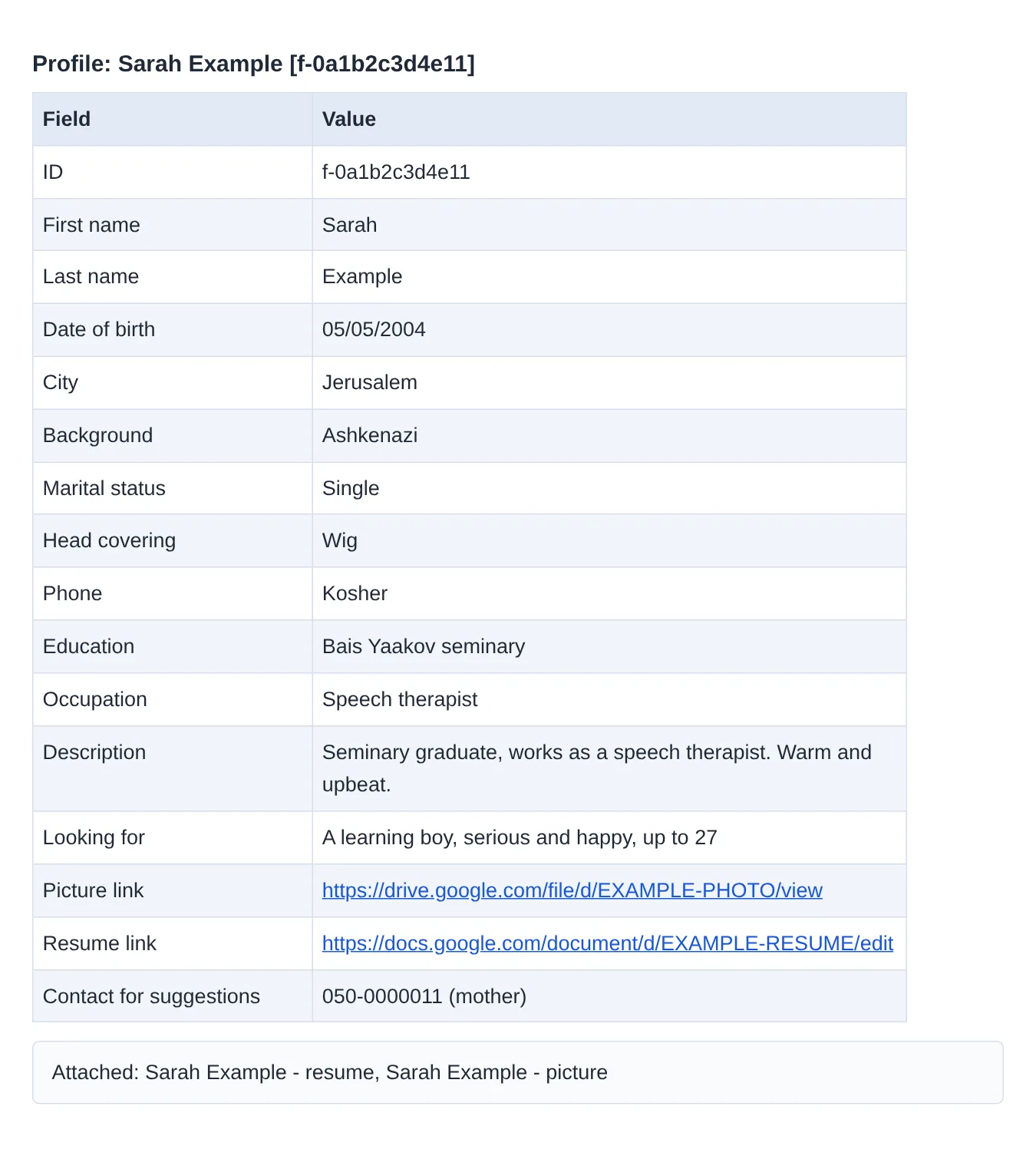
A candidate's full profile
Send a first and last name (or an ID such as f-0a1b2c3d4e11) as the subject, and get every column of that row in the sheet, including links, with the resume and picture attached as files when there are any.
How suggestions are chosen
Strict rules (anyone failing them is not suggested)
- Kohen and divorcée: a Kohen is never suggested with a divorced woman, and a divorced woman never gets a Kohen.
- Kohen status only when stated: a candidate is marked Kohen or daughter of a Kohen only when the sheet explicitly says so as a status (e.g. in the notes). Never from the surname. If Kohen isn't stated in the list, the person is treated as not a Kohen.
- Divorced man and daughter of a Kohen: allowed, so not excluded.
- Age window: the man's age minus the woman's must fall between age min and age max (default 0 to 3).
- Your stated requirements (the "partner …" fields, and for a man, head covering): a candidate whose detail differs is not suggested.
Held back (a detail is missing, not excluded)
When a strict rule depends on a detail the sheet doesn't state, the system doesn't guess. The profile isn't suggested, and the end of the reply says how many such profiles there were. For example:
- A request for a Kohen: a woman whose marital status is unclear (e.g. the row says both single and divorced).
- Anyone with no known age.
- A requirement you stated (e.g. partner community) when the candidate's row doesn't state that detail. Head covering is the exception: a candidate whose row doesn't mention it is shown.
The score
Among those who pass the rules, suggestions are ranked by a match score out of 100, built from what your request states:
| Item | Weight | When it counts |
|---|---|---|
| lifestyle | 35 | if you gave a lifestyle, and it matches |
| community | 25 | if you gave a community, "same community" is yes, and it matches |
| location | 10 | if you gave a location, and it matches |
| age | 20 | always: a gap of 0–3 years (the man older) |
Score = the share of weight that matched, out of the items checked. It measures fit to the criteria only. Deciding what is a good match stays with the matchmaker.
Subject and body commands
| You write | Where | You get |
|---|---|---|
| (blank subject) | subject | "title is mandatory. resend with title" (plus the same in Hebrew). No search runs. (Unless the first body line is a command, see below.) |
form | subject | A blank request form in English: every field, required ones first, optional ones marked. Fill it in and reply. |
טופס | subject | The same form in Hebrew. |
matronita or מטרוניתא | subject | The Midrash of the matron and Rabbi Yosi ben Halafta (Bereishit Rabbah 68:4), which the app is named after. |
5 more / more / עוד 5 / עוד | first line of the body, replying in the thread | The next suggestions not sent yet. Details. |
save defaults followed by lines | body | Saves your personal defaults: age min, age max, same community, language. They apply to every request of yours without retyping. (The halachic rules can't be changed.) |
show defaults | body | Shows your saved defaults. |
reset defaults | body | Goes back to the system defaults. |
first and last name, or an ID like [f-000000000001] | subject | The full profile: every column of that sheet row, in a table. By ID if one is given, otherwise by name (either order, ignoring niqqud and final letters). Several people with the same name all come back. An unknown name gets "No profile found". Picture and resume links are in the table; coming soon they'll also be attached as files. |
| any subject command (form, matronita, a name, an ID) | first line of the body | You can put the command on the first body line instead of the subject, when the subject is blank or ordinary, and in thread replies. A blank subject with an ordinary request body still gets "title is mandatory". |
Any other subject is an ordinary subject, and the body is read as a request. An email whose body has request fields is always a request, even if the subject is a name. A leading "Re:" or "Fwd:" is ignored.
Saving defaults (in the body):
save defaults
age min: -1
age max: 4
same community: no
Owner commands
Three commands manage the list of authorized users. They work only from the owners' email addresses. Any other registered user who sends them gets a reply that only owners can add or remove users.
add user: example@example.com
orהוסף משתמש: example@example.com
The address joins the authorized users and can send requests right away. An address that was removed before is authorized again.remove user: example@example.com
orהסר משתמש: example@example.com
The address is removed and gets no more suggestions, even if it is on the sheet's share list. Owners can't be removed.list usersorרשימת משתמשים
All authorized users, plus anyone who was removed.
- Put a command in the subject or in the body. One email can carry several commands, one per line, adding and removing together. One command can take several addresses separated by commas, and a line with only an email address gets the command above it (or the one in the subject).
- Your signature is ignored: reading stops at a signature line (--, "Thanks", "Regards", "Sent from…") and at quoted text, and lines without an email address (name, phone, greeting) are skipped. An email address in your signature is not added.
- Upper or lower case doesn't matter, and spaces around the colon are fine.
- The reply is short, Hebrew first and then English: one line per address (added, removed, already authorized, not on the list, owner can't be removed, or invalid email address), then the number of authorized users.
- Changes are saved and stay in effect after a restart.
Example:
The reply:
✅ example@example.com נוסף/ה למשתמשים המורשים. סה"כ מורשים: 12✅ example@example.com was added to the authorized users. Total authorized: 12
A multi-line example (the signature at the end is not read):
add user: example1@example.com
add user: example2@example.com
remove user: example3@example.com

--
John Doe
050-0000000
The reply:
✅ נוסף/ה: example1@example.com
✅ נוסף/ה: example2@example.com
✅ הוסר/ה: example3@example.com
סה"כ מורשים: 13
✅ Added: example1@example.com
✅ Added: example2@example.com
✅ Removed: example3@example.com
Total authorized: 13
More suggestions (5 more)
Each reply brings up to 5 suggestions. For the next ones, reply in the same thread with one of these on the first line:
5 more · more 5 · more · עוד · עוד 5 · 5 עוד
- Each time brings at most 5 suggestions. Asking for more than 5 brings 5, with the line "Limited to 5 results per request".
- Only suggestions not yet sent in this thread.
- The quoted text your mail app adds below ("On … wrote:") doesn't matter.
- When there are no more, you'll be told so, and you can send updated criteria.
- "more" in a thread with no results yet gets a note to send a request first.
IDs
Every profile has a stable ID, shown in brackets next to the name: f- plus 12 characters for a woman, m- plus 12 characters for a man (e.g. f-000000000001, made up).
- The ID stays the same across every sync, even when rows are added, deleted or moved in the sheet.
- It changes only if that row's name or contact details are edited in the sheet; the profile may then be suggested again in an old thread.
- Exact duplicate rows are counted once, so no two profiles share an ID.
- Send an ID as the subject (or the first body line) to get the full profile. If the ID has changed, the system falls back to the name next to it.
Privacy
- The profiles are real personal information about families.
- Replies go only to authorized matchmakers, and only to the address the request came from.
- The system doesn't pass information to anyone else or publish it. It only reads the sheet and never changes it.
- Reply contents are for your use as a matchmaker only. Please don't forward them.
FAQ
Why did I get few suggestions, or none?
Usually one of these: a narrow age window (default 0 to 3; try age min: -2 and age max: 6), a strict requirement you stated (partner community, partner phone, etc.) that many candidates don't state in the sheet, or a Kohen rule. The end of the reply says how many profiles were held back for a missing detail.
What does "more profiles were not shown" (held back) mean?
These candidates weren't excluded, but their row is missing a detail a strict rule depends on: marital status, age, or a requirement you stated. The system doesn't assume anything that isn't written, so it doesn't suggest them. If it matters, check the detail with the family and ask for the sheet to be updated.
How often does the data refresh?
Every hour the system re-reads the whole sheet, so a change in the sheet shows up within an hour at most. The mailbox is checked every minute, so a reply usually arrives within a minute or two.
I sent an email and got no reply at all.
Make sure you sent it from your authorized address. Email from an address that isn't approved gets no reply. If you used the right address, contact the admin.
I got "please clarify".
A required field is missing, or a line wasn't understood (unknown field name, a value not on the list, a field given twice). The reason is in the reply. Reply in the same thread with just the fix; your other details are kept.
Is Kohen status guessed from the surname?
No. Only when the sheet explicitly says the candidate is a Kohen or a daughter of a Kohen. If Kohen isn't stated in the list, the person is treated as not a Kohen. The same goes for your request: without kohen: yes, the man is treated as not a Kohen.
Can I write in Hebrew?
Yes, that's the main language. Use the Hebrew field names (the "Hebrew" column in the table) and the reply comes back in Hebrew. You can also set the reply language with the language field.
Contact
To join as an authorized matchmaker, for questions, or to correct details in the list, contact the admin through the SmartApz contact form.
The address for requests: matronitashiduchim@gmail.com (authorized matchmakers only).